
The Application Layer: A Practical Overview
To set the groundwork, let’s begin with a bit of networking theory, starting with the application layer.
Index:
| Part (click to see) | Short Description | |
|---|---|---|
| 1 | Architectures | Client-server = always-on server; P2P = peers are both client and server, self-scaling |
| 2 | Sockets & addressing | A process is identified by IP address + port |
| 3 | Transport services | TCP = reliable, ordered, flow + congestion control; UDP = none of that, minimal overhead |
| 4 | HTTP | Stateless request/response over TCP, port 80 (443 for HTTPS) |
| 5 | Status codes & cookies | Cookies add state on top of stateless HTTP |
| 6 | Web caches | Proxy serves local copies; conditional GET keeps them fresh |
| 7 | FTP | File transfer, control on port 21 |
| 8 | SMTP pushes (port 25); POP3/IMAP/HTTP pull | |
| 9 | DNS | Distributed hierarchical database: root → TLD → authoritative |
| 10 | P2P / BitTorrent | Distribution time grows far slower with N peers than client-server |
Network applications and architectures
A network app is a set of programs running on different end systems that talk to each other over the network. You only write code for the end hosts: routers in the network core never run application code. That is why the same app can run on your iphone/android, a laptop or a car, and why new apps can be deployed so quickly.
Examples: email, web, remote login, file sharing, streaming (YouTube, Netflix), multiplayer games, VoIP.
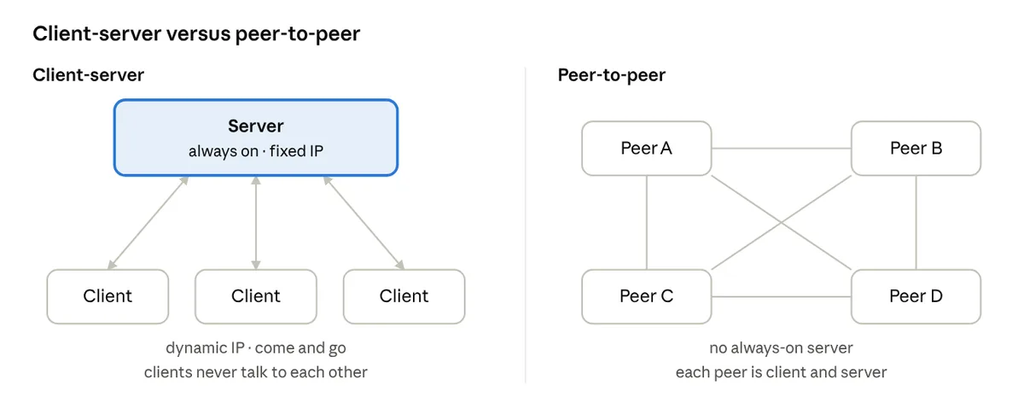
The basic differences between architectures can be summarized in a following table:
| Client-Server | P2P | |
|---|---|---|
| Server | Always-on host, permanent IP, usually in a data center (Google, Microsoft, company DC) | No always-on server |
| Clients / peers | Intermittently connected, may have dynamic IPs, never talk to each other directly | Arbitrary end systems talk directly; each peer is both client and server |
| Scaling | Server capacity must grow with demand | Self-scalable: each new peer adds upload capacity as well as demand |
| Management | Simple, centralized | Complex: peers come and go and change IP addresses |
| Examples | Web, email, most SaaS | BitTorrent, software/update distribution |
Processes, sockets and addressing
Applications are processes. Processes exchange messages through sockets. A process is addressed by IP address + port number.
Details:
- Client process initiates the communication (your browser). Server process waits to be contacted (the web server behind yahoo.com).
- One host runs many processes, and one server process serves many clients at once.
- A P2P application contains both client and server processes.
- Socket = the door between the application process and the transport layer. The sender pushes the message out of its door; the network carries it to the receiver’s door, which hands it up to the right process.
- Identifier = IP address of the host (IPv4 is 32-bit; IPv6 is 128-bit) + port number of the process on that host. Example of well-known ports: HTTP 80, HTTPS 443, SMTP 25, FTP 21 (control), DNS 53.
- Browsers hide :80 because it is the default for http://. A server can listen on any port — then the URL must say it, e.g. http://host:8080/.
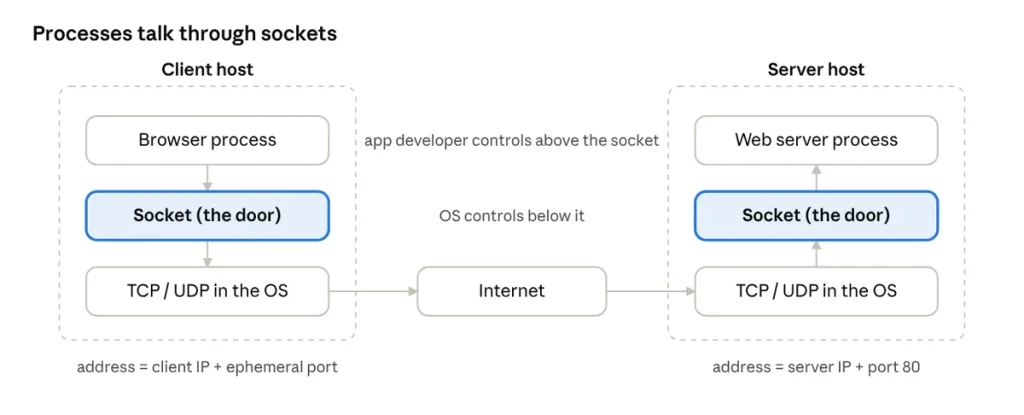
The developer only controls the process and chooses the socket type; everything below the socket belongs to the operating system.
What an application-layer protocol defines?
- Message types (e.g. request and response).
- Message syntax which fields exist and how they are delimited.
- Message semantics (what each field means).
- Rules: when and how a process sends and responds.
The four basic requirements:
Open protocols are defined in RFCs (HTTP, SMTP) so different vendors interoperate. Proprietary protocols (like Zoom) only work inside their own ecosystem.
Transport services an app needs: TCP vs UDP
An app picks its transport protocol based on four needs: data integrity, timing, throughput, security.
- Data integrity: some apps require 100% reliable delivery (email, file transfer, web transactions); others may tolerate some loss (streaming audio/video).
- Timing: some apps need low delay (telephony, games); on the other hand email arriving 30 sec. later doesn’t matter.
- Throughput: some apps need a minimum bandwidth to work at all (“bandwidth-sensitive”); others take whatever is available (“elastic”).
- Security: encryption, data integrity, authentication etc.
Requirements by application:
| Application | Data loss | Throughput | Time-sensitive |
|---|---|---|---|
| File transfer / download | No loss | Elastic | ❌ |
| No loss | Elastic | ❌ | |
| Web documents | No loss | Elastic | ❌ |
| Real-time audio / video (calls) | Loss-tolerant | Needs a minimum | ✅ — delay and jitter are audible |
| Stored (streamed) audio / video | Loss-tolerant | Needs a minimum | ✅, but buffering absorbs seconds |
| Interactive games | Loss-tolerant | Needs a minimum | ✅ |
TCP vs UDP:
| Service | TCP | UDP |
|---|---|---|
| Reliable delivery | ✅ retransmits lost data | ❌ |
| In-order delivery | ✅ | ❌ |
| Flow control (don’t overwhelm the receiver) | ✅ | ❌ |
| Congestion control (throttle when the network is overloaded) | ✅ | ❌ |
| Connection setup | Required (3-way handshake) | None — connectionless |
| Timing / minimum-throughput guarantee | ❌ | ❌ |
| Security | ❌ (added by TLS on top) | ❌ (DTLS / QUIC on top) |
| Header size | 20 bytes minimum | 8 bytes |
Which transport real apps use?
| Application | App-layer protocol | Transport |
|---|---|---|
| SMTP | TCP | |
| Remote login | SSH (formerly Telnet) | TCP |
| Web | HTTP/1.1, HTTP/2 | TCP |
| Web (modern) | HTTP/3 | QUIC over UDP |
| File transfer | FTP | TCP |
| Video on demand (Netflix, YouTube) | HTTP adaptive streaming (DASH / HLS) | TCP with HTTP/1.1–2; QUIC over UDP with HTTP/3 (YouTube uses it heavily, falling back to TCP when UDP is blocked) |
| Live / real-time video (calls, WebRTC) | RTP / SRTP, WebRTC | UDP |
| Internet telephony | SIP (signaling), RTP (media) | SIP over UDP, TCP or TLS; media over UDP |
| Name resolution | DNS | UDP (TCP for big answers and zone transfers) |
Streaming nuance:
Streaming video uses UDP is only half true. Classic video on demand is chunked HTTP over TCP so buffering hides retransmission delay, and TCP passes through every firewall. The UDP share comes from two places: HTTP/3 over QUIC (still reliable: QUIC retransmits, it just does so over UDP) and real-time media over RTP/WebRTC, where late packets are useless and are simply dropped.
The Web and HTTP
HTTP (HyperText Transfer Protocol) is the web’s application-layer protocol: a stateless, client-server, request/response protocol that runs over TCP, port 80. The HTTP over TLS (HTTPS) runs on port 443.
How a web page is built?
- A page = a base HTML file + referenced objects (images, JS, CSS, audio, video).
- Every object has its own URL = host name + path (e.g. somesite.com/test.gif).
- The client (browser, on any device) requests and renders objects; the server sends them, independent of the client’s hardware.
HTTP over TCP:
- Client creates a socket and opens a TCP connection to the server on port 80.
- Server accepts the connection.
- Browser and server exchange HTTP messages (request → response).
- TCP connection is closed — immediately (non-persistent) or later (persistent).
Stateless = the server keeps no memory of earlier requests. That keeps servers simple and scalable (nothing to resync after a crash). State is added on top with cookies (section 5).
Non-persistent vs persistent:
| Non-Persistent | Persistent | |
|---|---|---|
| Objects per TCP connection | At most one, then close | Many, over the same connection |
| Default in | HTTP/1.0 | HTTP/1.1 and later |
| Cost per object | 2 RTT + transmit time | 1 RTT + transmit (after the first object); pipelining cuts even that |
| OS overhead | New socket and buffers per object — browsers open parallel connections to compensate | One connection reused |
Example: non-persistent, index.html referencing 10 JPEGs
- Client opens a TCP connection to the server, port 80; the server accepts.
- Client sends
GET /home/index.html. - Server sends the base HTML in a response, then closes the connection.
- Client parses the HTML and finds 10 JPEG references.
- Steps 1–4 repeat for each JPEG → 11 TCP connections in total.
RTT (round-trip time) = time for a small packet to go from client to server and back.
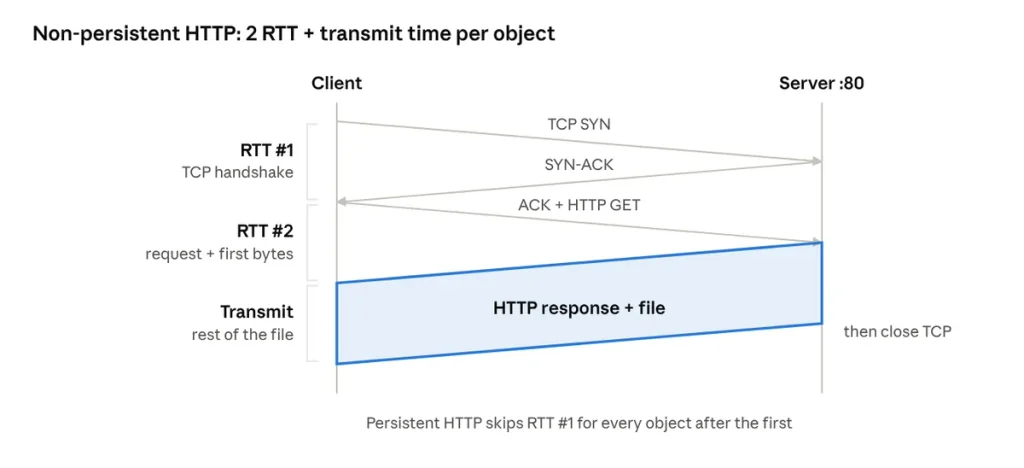
Formula: non-persistent response time = 2 RTT + file transmission time per object.
Example: base page + 10 images, ignoring transmission time:
| Mode | Cost |
|---|---|
| Non-persistent, serial | 11 × 2 RTT = 22 RTT |
| Persistent, no pipelining | 2 RTT (setup + base) + 10 × 1 RTT = 12 RTT |
| Persistent, with pipelining | 2 RTT + ~1 RTT for all images = ~3 RTT |
Message format:
GET /index.html HTTP/1.1
Host: www.example.com
User-Agent: Mozilla/5.0
Connection: keep-alive
Request = request line (method, path, version) + headers + blank line + optional body.
Response = status line + headers + blank line + body. Common methods: GET, POST, HEAD, PUT, DELETE.
HTTP status codes and cookies
Status codes appear in the first line (status line) of the server’s response.
| Class | Meaning | Codes to know |
|---|---|---|
| 1xx | Informational | 100 Continue, 101 Switching Protocols |
| 2xx | Success | 200 OK, 201 Created, 204 No Content |
| 3xx | Redirection | 301 Moved Permanently, 302 Found, 304 Not Modified (cache is fresh) |
| 4xx | Client error | 400 Bad Request, 401 Unauthorized (not authenticated), 403 Forbidden (authenticated but not allowed), 404 Not Found |
| 5xx | Server error | 500 Internal Server Error, 502 Bad Gateway, 503 Service Unavailable, 505 HTTP Version Not Supported |
Cookies: because HTTP is stateless, sites keep user state with cookies: the server hands the browser an ID, and the browser sends it back on every later request.
The four components:
- Set-Cookie: header line in the HTTP response.
- Cookie: header line in later HTTP requests.
- Cookie file on the user’s host, managed by the browser, per site.
- Backend database entry at the website, keyed by the ID.
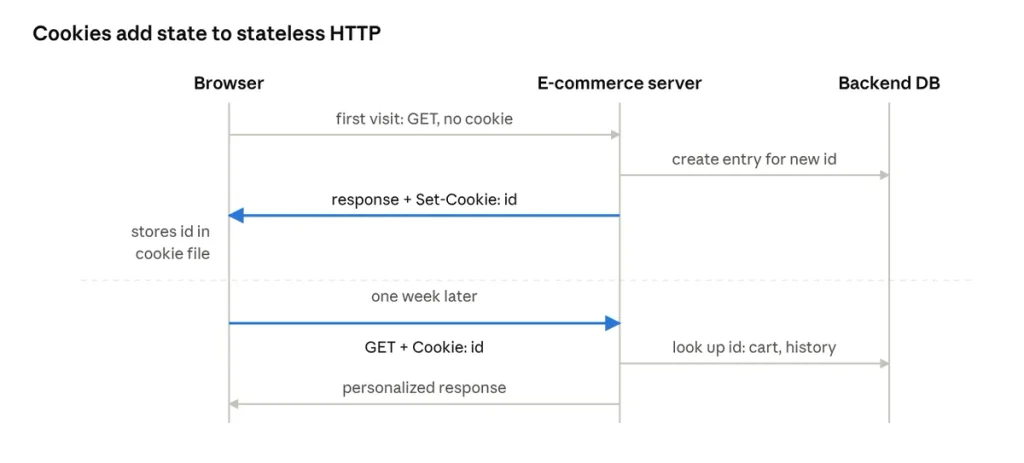
On a first visit the site creates an ID and a DB entry; a week later her browser sends the ID back and the site restores her cart and history.
Uses: authorization / login sessions, shopping carts, recommendations, user session state (webmail).
Privacy: third-party cookies let ad and tracking networks follow a user across many sites and build a profile: one of the web’s biggest privacy problems, which is why browsers now restrict them.
Web caches (proxy servers) and conditional GET
A web cache answers client requests without contacting the origin server. It is both a server (to the browser) and a client (to the origin server).
How it works:
- The browser is configured to send all HTTP requests to the cache.
- Hit the object is in the cache → returned immediately.
- Miss: the cache requests the object from the origin server, stores a copy, and returns it to the client.
Why: lower response time, less traffic on the institution’s access link, and small (“poor”) content providers can deliver content effectively because caches near users do the heavy lifting. Typically installed by an ISP, university or company. Today’s large-scale version is the CDN.
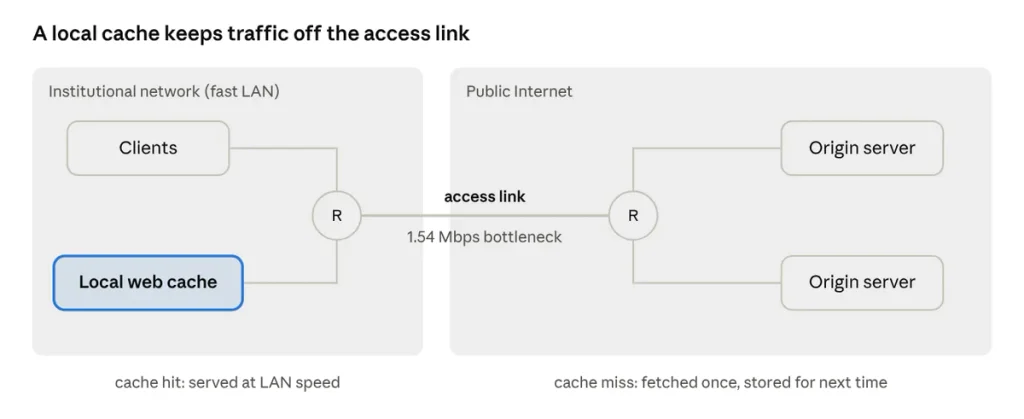
Worked example: a saturated access link
| Option | Effect | Cost |
|---|---|---|
| Do nothing | Access link at ~99% utilization → queueing delay explodes as utilization approaches 1 | — |
| Buy a 10× faster link | Utilization drops to ~9.9%, delays become small | Expensive, recurring — “what the ISP would love” |
| Install a local cache | If, say, 40% of requests hit the cache, the link only carries the other 60% → utilization well below saturation, most requests served at LAN speed | Cheap: one box |
Conditional GET: keeping the cache fresh
cache → origin:
  GET /page.html HTTP/1.1
  If-Modified-Since: <date of cached copy>

origin → cache, not changed:
  HTTP/1.1 304 Not Modified      (no body — serve the cached copy)

origin → cache, changed:
  HTTP/1.1 200 OK + new object   (cache stores it for next time)
Modern equivalents: ETag + If-None-Match, and Cache-Control: max-age to avoid asking at all.
FTP: File Transfer Protocol
Client-server protocol for moving files between hosts (classic use: uploading newly built web pages to a server). Defined in RFC 959.
Details:
- Two TCP connections: Control connection, port 21, stays open for the whole session and carries commands: USER, PASS, LIST, RETR (download), STOR (upload). Control info travels “out of band” from the data. Data connection, a new one for each file transferred (port 20 in active mode).
- Stateful, unlike HTTP: the server remembers the user’s login and current directory for the session.
- Active vs passive mode: in active mode the server connects back to the client for data (breaks behind NAT/firewalls); in passive mode the client opens the data connection too.
- Everything, including the password, is cleartext → replaced in practice by SFTP (over SSH) or FTPS (FTP over TLS).
Electronic mail: SMTP, POP3, IMAP
Email has three parts: user agents, mail servers, and SMTP. SMTP pushes mail to the recipient’s server; POP3 / IMAP / HTTP let the recipient pull it.
Components
- User agent (mail reader): Outlook, Thunderbird, iPhone Mail: compose, read, reply.
- Mail server: holds a mailbox of incoming mail per user and a message queue of outgoing mail.
- SMTP: used between mail servers (and from the user agent up to its own server).
SMTP details
- Runs over TCP, port 25, for reliable delivery.
- Direct transfer: sending server → receiving server, no intermediate mail servers in the textbook model (real deployments often add relays, spam filters and smart hosts).
- Three phases: handshaking (greeting) → transfer of messages → closure.
- Commands are ASCII text; responses are a status code + phrase. Message bodies are 7-bit ASCII (MIME encodes attachments).
Classic Scenario: Alice sends to Bob
- Alice composes a message to Bob’s address in her user agent.
- Her user agent sends it to her mail server, where it waits in the queue.
- The client side of SMTP on her server opens a TCP connection to Bob’s mail server.
- The SMTP client sends Alice’s message over that connection.
- Bob’s mail server puts the message in Bob’s mailbox.
- Bob opens his user agent and reads it.
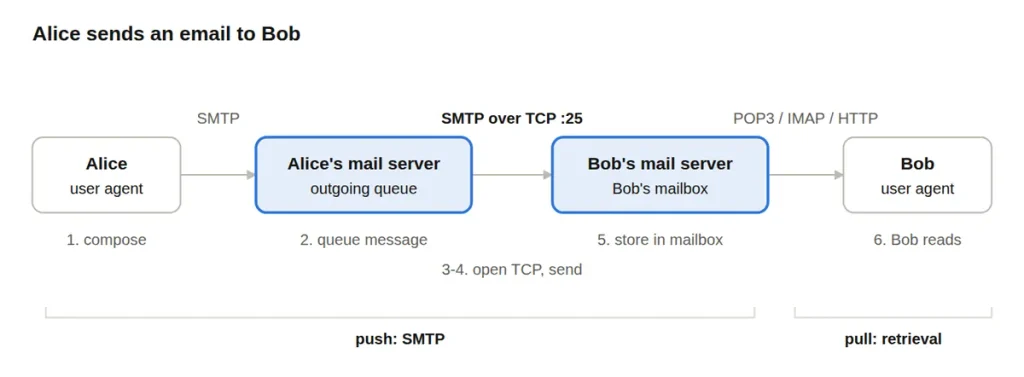
Alice’s server acts as the SMTP client, Bob’s as the SMTP server; Bob never talks SMTP at all.
SMTP dialogue (what it looks like on the wire):
S: 220 hamburger.edu
C: HELO crepes.fr
S: 250 Hello crepes.fr
C: MAIL FROM: <alice@crepes.fr>
S: 250 Sender ok
C: RCPT TO: <bob@hamburger.edu>
S: 250 Recipient ok
C: DATA
S: 354 End data with <CR><LF>.<CR><LF>
C: Do you like ketchup?
C: .
S: 250 Message accepted
C: QUIT
S: 221 Closing connection
Retrieval protocols:
| POP3 | IMAP | HTTP (webmail) | |
|---|---|---|---|
| Model | Download to the device; originally “download and delete”, later “download and keep” | Messages stay on the server | Browser talks to a web app (e.g. Gmail) |
| State across sessions | Stateless | Keeps state: folders, read/unread flags | Server-side |
| Multi-device | Poor — read on one device, still unread on another | Good | Good |
| Ports | 110 (995 with TLS) | 143 (993 with TLS) | 443 |
DNS: Domain Name System
DNS translates human-friendly hostnames (example: www.yahoo.com) into IP addresses. It is a distributed, hierarchical database plus an application-layer protocol (mainly UDP, port 53) that hosts and name servers use to query it. A core Internet function built at the application layer: complexity pushed to the network’s edge.
Services
- Hostname → IP address translation.
- Host aliasing: an alias points to a canonical name (CNAME).
- Mail server aliasing: find the mail server for a domain (MX).
- Load distribution: one name maps to many replicated web server IPs, rotated between clients.
Why not one central DNS server? Single point of failure, huge traffic volume, a distant database for most users, and endless maintenance.
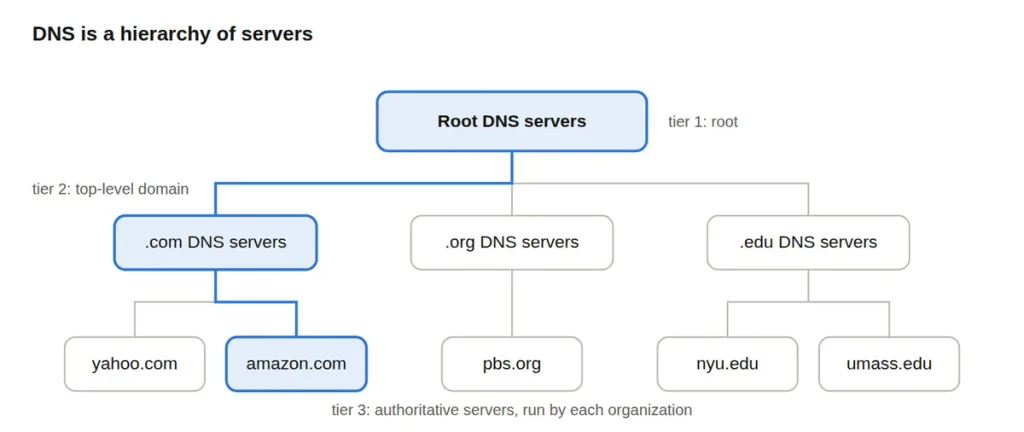
To resolve amazon.com (highlighted path): ask a root server for the .com servers, ask a .com server for amazon.com’s server, ask that server for the IP.
Server types:
| Type | Role | Notes |
|---|---|---|
| Root | Returns the addresses of TLD servers | 13 logical root identities (a–m), each replicated worldwide via anycast into about 2,000 instances in total |
| TLD | Responsible for .com, .org, .edu, .jobs, and country codes (.uk, .ge) | .com / .net run by Verisign, .edu by Educause |
| Authoritative | Holds the organization’s own records; gives the final, authoritative answer | Run by the org itself or a provider (GoDaddy, Cloudflare) |
| Local (default) name server | The host’s first stop; acts as a proxy and cache | Not strictly part of the hierarchy; run by the ISP, company or university |
Resolution: iterated vs recursive
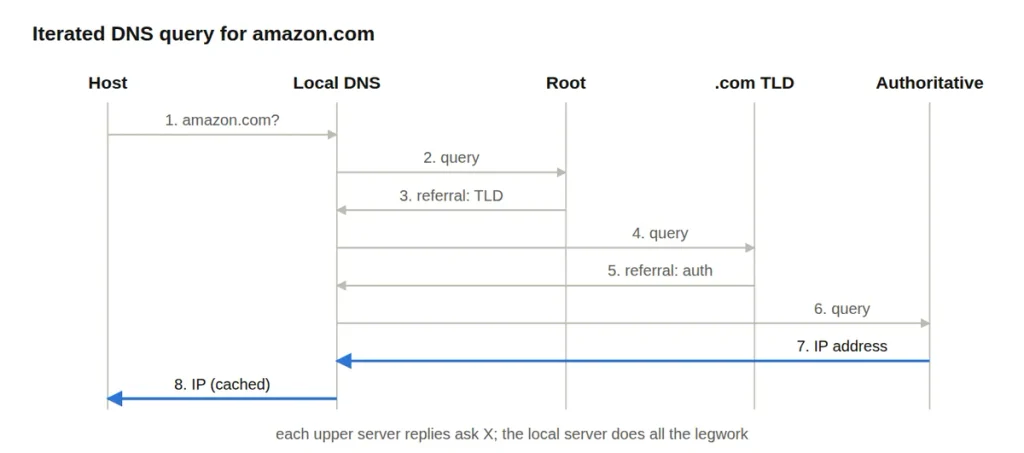
Caching
- Once any name server learns a mapping, it caches it; every entry expires after its TTL
- TLD server addresses are usually cached in local servers, so root servers are rarely contacted.
- Cached entries can be out of date until their TTL runs out: DNS is best-effort consistent.
Resource records: format (name, value, type, TTL):
| Type | Name | Value | Example |
|---|---|---|---|
| A | Hostname | IPv4 address | www.example.com → 203.0.113.10 |
| AAAA | Hostname | IPv6 address | — |
| NS | Domain | Hostname of the authoritative name server | example.com → ns1.example.com |
| CNAME | Alias | Canonical (real) name | ibm.com → servereast.backup2.ibm.com |
| MX | Domain | Name of the mail server | example.com → mail.example.com |
| TXT / PTR / SOA | — | Free text (SPF, DKIM, verification) / reverse lookup / zone metadata | — |
Registering a domain steps: startup “Superonlinewebpage”
- Register superonlinewebpage.com with a registrar (Network Solutions, GoDaddy).
- Give the registrar the names and IP addresses of your authoritative name servers (primary and secondary).
- The registrar inserts an NS record and a matching A record (glue) into the
.comTLD servers - In your authoritative server, create an A record for
www.superonlinewebpage.comand an MX record for mail.
Attacks on DNS
Because DNS is crucial for Internet to function we need to effectively protect it from any attacks like:
| Attack | How | Defense |
|---|---|---|
| DDoS on root / TLD | Flood the servers with bogus traffic | Anycast, caching (root rarely needed); TLD floods are more dangerous |
| Redirect / man-in-the-middle | Intercept queries and return forged answers | DNSSEC, DNS over HTTPS / TLS |
| Cache poisoning | Send forged replies that a resolver caches for everyone (Kaminsky attack) | Source-port and ID randomization, DNSSEC |
| Amplification DDoS | Spoof the victim’s IP; small query → large response aimed at the victim | Rate limiting, no open resolvers |
Peer-to-peer applications: BitTorrent and DHT
Such application are not always-on server, end systems join/leave and upload to each other. Because every new peer also adds upload capacity, distribution time grows much more slowly with the number of peers than in client-server.
| Architecture | Lower bound on time to get F to all N peers | Grows with N? |
|---|---|---|
| Client-server | D_cs ≥ max{ N·F / u_s , F / d_min }: the server must upload N copies one after another | Linearly |
| P2P | D_p2p ≥ max{ F / u_s , F / d_min , N·F / (u_s + Σu_i) }: server uploads at least one copy; total upload capacity grows (N) | Levels off |
Example: assume every peer uploads at rate u, F/u = 1 hour, u_s = 10u, d_min ≥ u_s:
| Peers (N) | Client-server | P2P |
|---|---|---|
| 5 | 0.5 h | 0.33 h |
| 10 | 1.0 h | 0.5 h |
| 20 | 2.0 h | 0.67 h |
| 35 | 3.5 h | 0.78 h (never exceeds 1 h) |
BitTorrent (example of P2P and its features)
- The file is split into chunks (real torrents pick the piece size by file size, commonly 256 KB to a few MB).
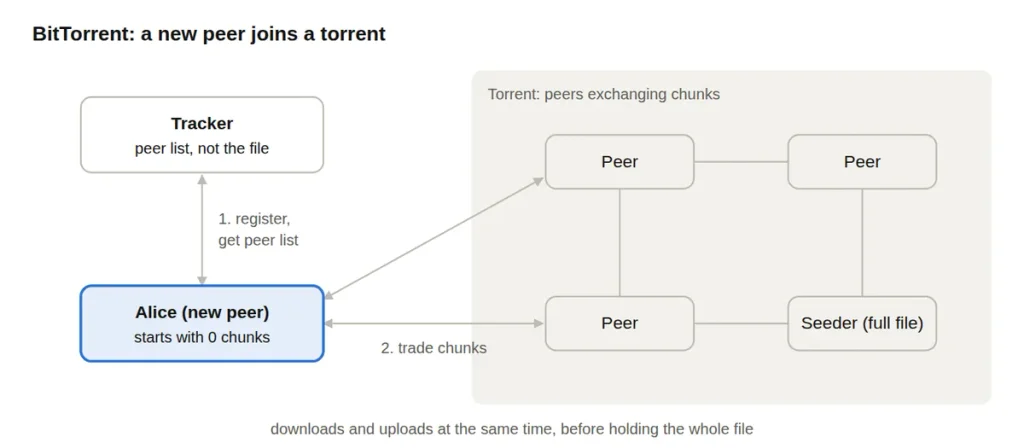
- A torrent = the group of peers exchanging chunks of one file.
- The tracker keeps a list of participating peers: it does not hold the file.
- A new peer registers with the tracker, gets a list of peers, connects to a subset (its neighbors), and starts with no chunks. It downloads chunks and uploads the chunks it has at the same time, without waiting for the full file.
- Requesting: rarest chunks first, so rare pieces spread quickly.
- Sending (tit-for-tat): upload to the ~4 neighbors currently sending to you fastest; every 30 s “optimistically unchoke” a random peer so newcomers can get started.
- With the full file, a peer can leave (selfishly) or stay as a seeder (altruistically).
- Also used for software distribution: game patches, OS images, internal release rollouts.
DHT: distributed hash table
- A database of (key, value) pairs spread across the peers themselves, like a phone book split among many people (analogy: name → social security number).
- In BitTorrent the key identifies the content (e.g. a movie’s hash) and the value is the list of IP addresses of peers that have it. This lets torrents work without a central tracker.
- Privacy consequence: every peer’s IP address is visible to the swarm, so anyone sharing a file is publicly identifiable.
That is it for today, next time see you in an article about Transport Layer 🙂